
Security
Fomo App Security Checklist: 12 Steps to Keep Your Wallet Safe
Is the Fomo app safe to use? A 12-point security checklist: biometric lock, securing your login email, key backup, phishing defences and safe withdrawals.
The Fomo trading app is safe to use in the sense that it is a real product from a documented company, and your wallet is non-custodial. That second point cuts both ways: Fomo Labs does not hold your funds, so nobody can reverse a transfer or refund a drained wallet. Almost every loss we have seen reported came from phishing or a compromised login, not from a flaw in the app. These twelve steps close those gaps. They take about twenty minutes. Settings were checked on September 20, 2026.
The four that matter most
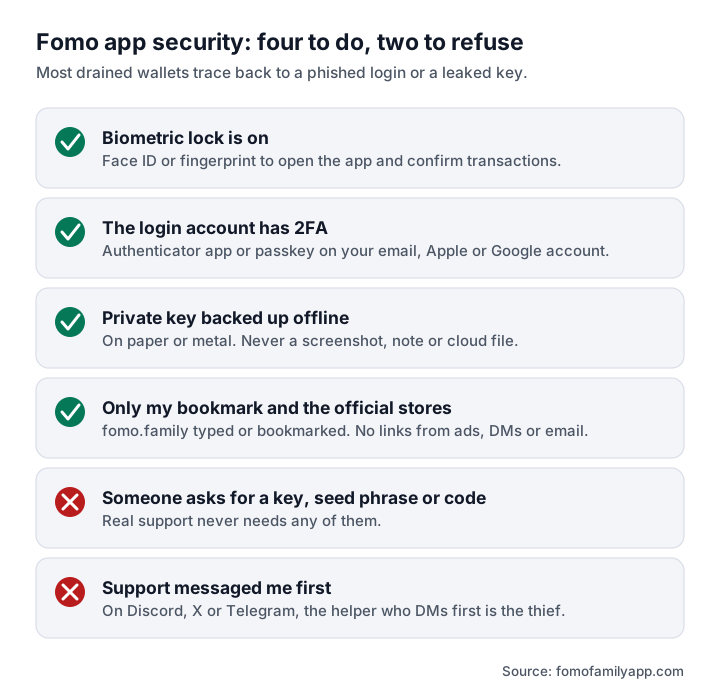
If you do nothing else, do the four items in the diagram below: lock the app, lock the login behind it, back up the key offline, and only ever reach Fomo from your own bookmark.
Lock down the account
1. Turn on biometric lock. In the app's settings, require Face ID, Touch ID or fingerprint to open the app and to confirm transactions. A borrowed or stolen unlocked phone should not be enough to trade or withdraw.
2. Secure the login behind the wallet. Your Fomo wallet is tied to the email, Apple or Google account you signed up with. Whoever controls that account can sign in as you. Give it a unique password from a password manager and turn on two-factor authentication with an authenticator app or passkey, not SMS. Fomo itself does not have a separate 2FA code for every trade, so the 2FA on your email, Apple ID or Google account is the 2FA for your wallet.
3. Protect your phone number. Ask your carrier for a port-out or SIM-swap lock. If SMS is a recovery option on your email, a hijacked number becomes a hijacked wallet.
4. Use a strong device passcode. Six digits at minimum, and no notification previews on the lock screen for email or messages, which is where login codes appear.
Back up and limit what is at risk
5. Export and store your private key offline. Do it once, on a trusted network, and write it on paper or a metal backup. Never in a screenshot, notes app, email or cloud drive. Steps are in Fomo app wallet export.
6. Keep only working capital in Fomo. A trading wallet on a phone is a hot wallet. Move profits you do not plan to trade to a hardware wallet or a regulated exchange.
7. Send a test withdrawal to every new address. Send a few dollars, confirm it arrives on the right network, then send the rest. Check the first and last characters of the address after pasting; clipboard-swapping malware exists. See how to withdraw from Fomo app.
Shut out phishing
8. Bookmark fomo.family and use only the bookmark. Do not reach the login page from a search result, an ad, an email or a link in a message. Install the app only from the Fomo app for PC.
9. Turn off direct messages from server members on Discord, and ignore DMs on X and Telegram. Real support does not contact you first. Anyone who messages offering help is not Fomo.
10. Know what support never asks for. A private key or seed phrase, a login code, a screen share, remote-access software, a "verification" deposit, or for you to "connect your wallet" to fix a problem. Any one of these means you are talking to a thief. Official channels are on Fomo app status.
11. Do not touch tokens you did not buy. Unexpected tokens in your wallet, airdrop claim links and "revoke" sites sent by strangers are bait. If you ever import your Fomo key into another wallet and connect it to a dApp, review and revoke its token approvals afterwards with a well-known tool you found yourself.
Keep the device clean
12. Maintain the phone. Keep the operating system and the app updated, install nothing from outside the official stores, do not jailbreak or root the device, and avoid signing in on shared computers. On the web app, use a browser profile without unknown extensions; malicious extensions can read pages and swap addresses.
What these steps do not protect you from
Security stops theft. It does not stop losses from the tokens themselves. A meme coin can fall 90% in a day, a developer can pull liquidity, and a token can be built so that it cannot be sold. Those are market and token risks, covered in is Fomo app legit?. The checklist above only keeps the money that is yours from being taken by someone else.
If you think your account is compromised
- From a clean device, move funds to a wallet whose key has never touched the affected phone or email.
- Change the password on the login email or account and sign out of all sessions.
- Revoke unknown devices from your Apple or Google account.
- Contact support through the in-app help or the official site only.
- Ignore every "fund recovery" service that contacts you afterwards. They are a second scam.
On-chain transfers are final. Speed matters more than anything else in the first minutes. Common scam patterns are described in fake Fomo app.
Frequently asked questions
Is the Fomo app safe to use?
The app is a legitimate non-custodial product. It is as safe as the login account behind it and your habits around links, keys and messages.
Does the Fomo app have 2FA?
Sign-in runs through your email, Apple or Google account, so enable two-factor authentication there and add the biometric lock inside the app.
Can Fomo recover my funds if I am hacked?
No. Fomo Labs does not hold your keys and cannot reverse on-chain transfers.
Should I export my private key?
Yes, once, stored offline. It lets you reach your funds if the app or your login is unavailable. Anyone who sees it controls the wallet.