
Tutorial
Fomo App Alerts and Notifications: Setup, Muting and a Sensible Default
How alerts work in the Fomo Family app: trader alerts, price alerts and push notifications, how to turn them on or mute them, and a setup to avoid overtrading.
Alerts are the feature that makes the Fomo trading app feel alive, and the feature most likely to cost you money. A notification that a trader you follow just bought something is an invitation to act within seconds, usually without research. This guide explains which alerts exist, how to switch them on and off, and a default setup that keeps the useful ones and silences the rest. Menu names move between app versions; this reflects the app on September 20, 2026.
The types of alert in the Fomo app
| Alert | What triggers it | Useful for | Risk |
|---|---|---|---|
| Trader alert | Someone you follow buys or sells | Seeing ideas from traders you have vetted | Buying late, after the price has moved |
| Price alert | A token you watch or hold moves | Exits and entries you planned in advance | Few; this is the healthy kind |
| Order and transfer updates | Your buy, sell, deposit or withdrawal completes or fails | Knowing a trade actually filled | None |
| Social activity | New followers, comments, reactions | Little | Pulls you back into the app |
| Trending and promotional | Tokens or features the app highlights | Little | Encourages impulse trades |
Not every version of the app exposes every toggle separately. If you cannot find a price alert on a token page, use the chart's level markers or a separate price tracker for the same job.
How to turn on alerts for a trader
- Open the trader's profile from the feed, a leaderboard or a token's holder list.
- Tap follow.
- Enable alerts for that trader from their profile, usually a bell or alert toggle next to the follow button. Following without alerts adds their trades to your feed but does not notify you.
- Make sure notifications are allowed for the app in your phone's settings, otherwise nothing arrives.
Following is explained in more detail in how to copy trade on Fomo app.
How to set a price alert
Open the token page, look for the alert or bell control near the chart, and choose a price or percentage move. Set alerts at the levels you decided on before you bought: a take-profit level above and a maximum-loss level below. An alert is only a reminder. It does not sell for you, and a meme coin can fall through your level before you open the app. For positions that need a real order, see Fomo app stop loss.
How to mute or turn off notifications
- One trader: open their profile and switch their alert toggle off. You keep following; the pushes stop.
- One category: in the app, open your profile, then settings, then notifications, and switch off the categories you do not want.
- Everything, temporarily: use your phone's focus or do-not-disturb mode and exclude the app. This is the simplest way to stop trading at night.
- Everything, permanently: disable notifications for the app in iOS or Android settings.
Why alert overload leads to overtrading
The pattern is consistent among people who lose money following others:
- You are always late. By the time a push reaches you, the trader has filled and the price reflects it. On thin tokens the move you are chasing is partly their own buy.
- Every alert feels urgent. Thirty followed traders can produce hundreds of pushes a day. Acting on a fraction of them means dozens of trades, each paying fees and slippage.
- You see entries, not exits. Traders rarely announce a sale in advance. Many followers hold long after the trader has left.
- Social alerts reopen the app. A comment notification has nothing to do with your positions, but once the app is open the feed does the rest.
The cost is measurable. Small, frequent trades carry the highest proportional fees, as the numbers in Fomo Family trading fees show.
A recommended alert setup for beginners
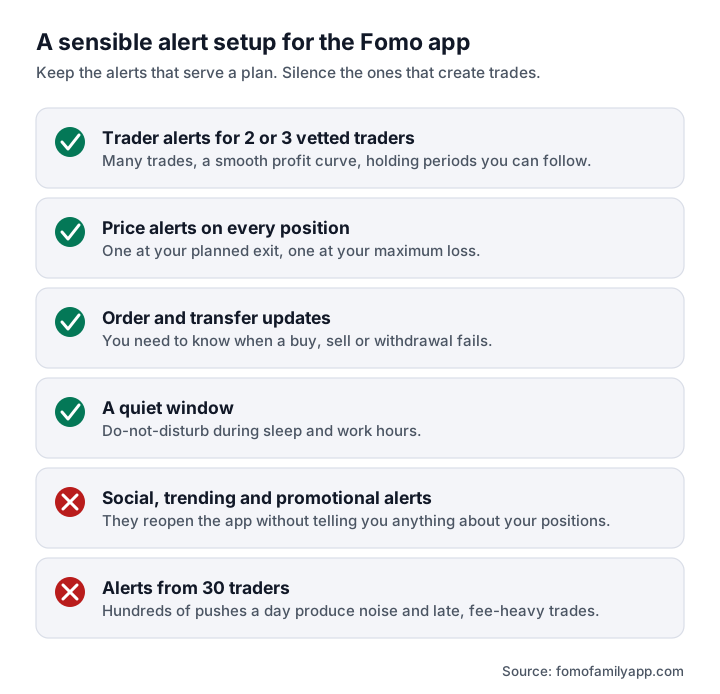
- Alerts on for two or three traders only. Pick them with the profile checks in Fomo Family leaderboard: many trades, a smooth profit curve, holding periods you could realistically follow.
- Price alerts on every position you hold, at your planned exit and your maximum loss.
- Order and transfer updates on. You need to know when a trade fails.
- Social, trending and promotional alerts off.
- A quiet window. Schedule do-not-disturb for sleep and work hours.
- A rule for acting on a trader alert: open the token, check liquidity and holders, and decide the size and exit before you buy. If that takes longer than the move lasts, you were never going to catch it.
Review the list monthly. If a trader's alerts have not led to a single trade you were glad you made, turn their alerts off.
Notifications not arriving?
- Check that notifications are allowed for the app in your phone settings, including lock screen and banners.
- Turn off battery optimisation for the app on Android; aggressive power saving delays pushes.
- Confirm alerts are enabled for the trader, not only follow.
- Update the app and sign out and back in.
- The web app relies on browser notifications, which are less reliable than mobile push.
More fixes are in Fomo app failed to sell.
Frequently asked questions
Does the Fomo app notify me when a trader sells?
If alerts are enabled for that trader, their sells are posted like their buys. You will still see it after the fact, not before.
Can I get alerts without following someone publicly?
Following is what adds a trader to your feed and alerts. Check the privacy options in your profile settings for what others can see.
Do alerts work on the web app?
The feed updates on the web app, but push alerts depend on browser notification permission and are less dependable than on a phone.
Will a price alert sell my tokens automatically?
No. An alert only notifies you. Automatic exits need an order type that executes on its own.