
Security
Fomo App Private Key and Wallet: How Custody Works, How to Export and How to Stay Safe
How the Fomo Family app wallet works (non-custodial, Privy), whether you can export your private key, how to back up access, and the private-key scams to avoid.
Fomo creates a wallet for you when you sign up. Understanding what kind of wallet it is, and what that means for control and risk, is the most important security topic for any Fomo user. This guide covers custody, export, backup and the scams built around private keys.
What kind of wallet Fomo gives you
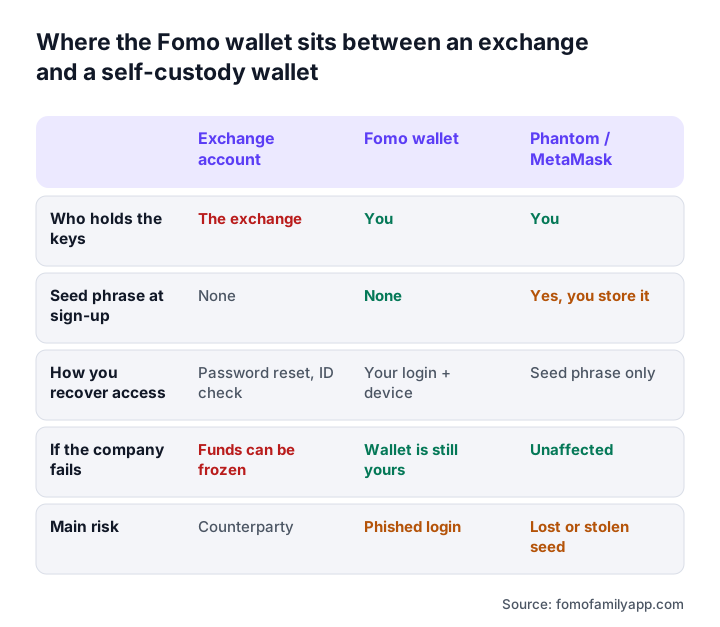
Fomo uses embedded-wallet infrastructure (Privy) to generate a non-custodial wallet at sign-up. The key is created and secured on your device and unlocked by your login and biometrics. Fomo Labs does not hold your keys and cannot move your funds. Your wallet has a real address on each supported chain, which you can view on explorers such as Solscan or Basescan.
This is different from a centralised exchange, where the company holds the assets and you hold a claim. It is closer to Phantom or MetaMask, but without a seed phrase to manage at sign-up.
Can you export your Fomo private key?
Embedded wallets built on Privy generally support exporting the private key so you can import it into another wallet. Look in the Fomo app trading under wallet, security or settings for an export or backup option. If present, the process typically requires biometric confirmation and shows the key once.
If the option is not visible on your version, check the help centre at fomo.family/answers or ask in-app support whether export is available for your account. Do not use any third-party tool claiming to "extract" your Fomo key; that is a scam.
How to back up access safely
- Secure the login first. Your Fomo login (email, Apple or Google) plus device biometrics is your primary access. Use a strong, unique password on that email or account and enable two-factor authentication on it.
- Export the key if available and write it on paper or store it in an encrypted password manager. Never in screenshots, notes apps synced to the cloud, or messaging apps.
- Test the backup by importing the key into a separate wallet app with a tiny balance, then deleting it from that app.
- Keep the recovery method current. If you change email providers or lose access to your Apple or Google account, update Fomo before, not after.
What happens if you lose your phone
Your funds are on-chain, not on the phone. Install Fomo on a new device, sign in with the same method, and the wallet is restored through the embedded-wallet recovery process. If you also lost access to the login account itself and have no exported key, recovery may be impossible; this is the trade-off of non-custodial design.
Private key scams targeting Fomo users
- Fake support asking for your key to "verify", "unlock a withdrawal" or "process an airdrop". Real support never needs it.
- "Key checker" websites that claim to validate your wallet. They steal what you paste.
- Wallet-drainer links in DMs and fake airdrop pages that ask you to connect and sign. See Fomo app token.
- Recovery services that promise to recover lost funds for a fee, then ask for your key.
If you have ever entered your key or seed phrase anywhere other than a wallet app you control, assume it is compromised. Move your funds to a new wallet immediately.
KYC and verification
Fomo does not require identity verification for crypto deposits and trading. The Apple Pay onramp is run by Coinbase and may ask for identity and region verification. Some withdrawals trigger a verification step as a risk control. None of these legitimate processes ask for a private key. See Fomo app verification.
Frequently asked questions
Does Fomo hold my crypto?
No. The wallet is non-custodial; Fomo Labs does not control your keys.
Can I import my Fomo wallet into Phantom or MetaMask?
If key export is available in your app version, yes, using the exported private key. Test with a small balance first.
Is it safe to give Fomo support my private key?
Never. No legitimate support process requires it.
Does Fomo work as a general Web3 wallet?
Not currently. It is a trading wallet and does not connect to arbitrary dApps.