
Tutorial
How to Use the Fomo Family App: A Beginner's Step-by-Step Tutorial
A beginner tutorial for the Fomo Family app: set up the account safely, fund it, read the feed and leaderboards, place a first small trade and withdraw.
This tutorial takes you from installing the Fomo trading app to your first withdrawal, with the habits that keep beginners out of trouble. It assumes you have never used a crypto trading app. If you want the short overview first, read how does Fomo app work.
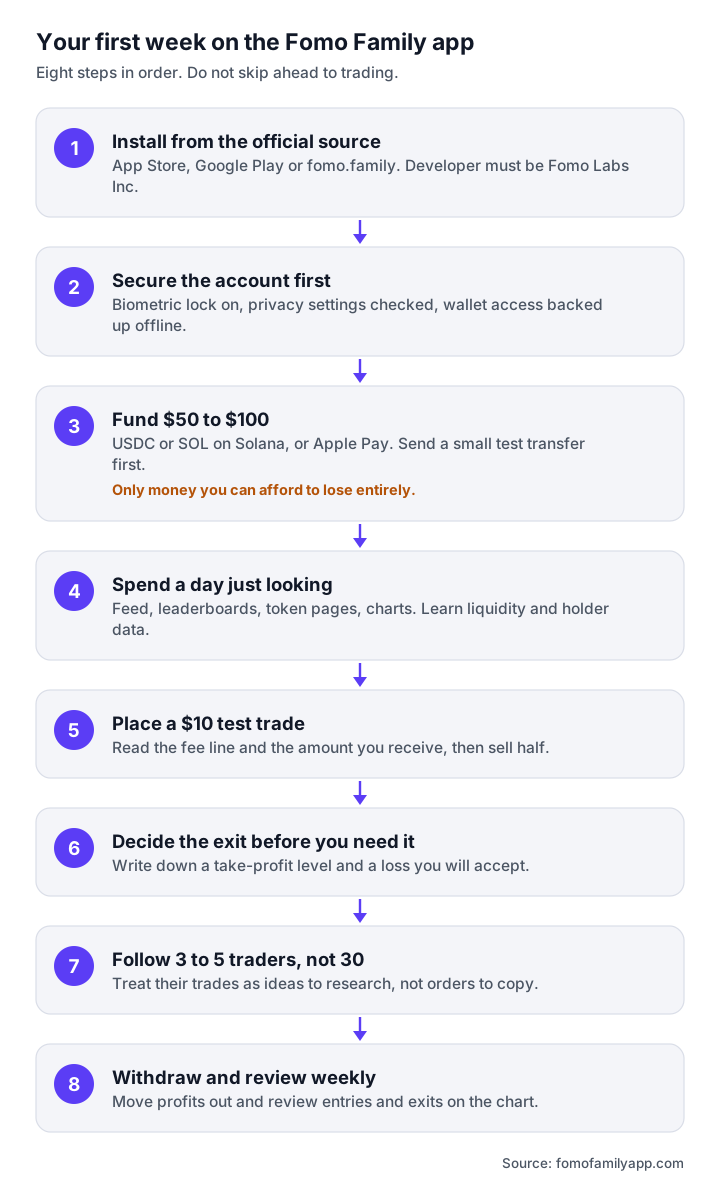
Step 1: Install from the official source
Install from the App Store or Google Play, or open fomo.family in a browser. Confirm the developer is Fomo Labs Inc. Do not install from APK sites or links in DMs. See the Fomo app iOS for links and the reasons this matters.
Step 2: Set the account up properly the first time
- Sign up with email, Apple or Google. Remember which one you used; you will need the same method on other devices.
- Enable Face ID, Touch ID or Android biometrics immediately.
- If you have a Fomo app promo code, make sure you opened the referral link before registering.
- Open profile settings and decide what you want to share publicly. By default your trades appear on your profile.
- Back up wallet access. Look for the export or backup option in wallet settings and store it offline. Our Fomo app wallet page explains why.
Step 3: Fund with an amount you can afford to lose entirely
For a first week, $50 to $100 is plenty. Deposit USDC or SOL on Solana for the lowest fees, or use Apple Pay via Coinbase if it is available to you. Send a small test transfer first, confirm it arrives, then send the rest. Details in how to add money to Fomo app.
Step 4: Learn the discovery surfaces before you use them
Spend a day just looking:
- Feed: notice how fast tokens move after a big account posts a buy, and how often the same account sells within the hour.
- Leaderboards: open the top five traders on the weekly board. Compare their monthly and all-time charts. Notice how many are one-spike profiles.
- Token pages: learn to read liquidity, holder count, top-holder percentage and token age. A token where the top ten holders own most of the supply can be dumped at any moment.
- Charts: the TradingView charts show your own buys and sells, which is useful later for reviewing mistakes.
Step 5: Place a first trade that is deliberately too small
Pick a token with reasonable liquidity (for example, a well-known meme coin rather than a token launched an hour ago). Buy $10. On the confirmation screen, read the fee line and the "you receive" amount. After it fills, open your portfolio and see the P&L update. Then sell half. You have now seen a full round trip and know what the fees look like. See fees on Fomo app for why small trades are proportionally expensive.
Step 6: Decide the exit before you need it
Before every real trade, write down two numbers: where you will take profit and where you will accept the loss. Perps positions let you set these as orders; for spot tokens, set a price alert and act on it. The single most common beginner mistake on Fomo is holding a falling token because the feed is still bullish.
Step 7: Follow a few traders, not many
Follow three to five traders whose theses you understand, with alerts on for at most one or two. Treat their trades as ideas to research, not orders to copy. Read how to copy trade on Fomo app for how to evaluate a profile.
Step 8: Withdraw and review weekly
Once a week, move any profit you do not intend to trade to a wallet you control or to an exchange. Review your closed trades on the chart: which entries were late, which exits were emotional. Checking positions once a week rather than every hour is the best way to avoid overtrading.
Habits that keep you safe
- Never share a seed phrase, private key or one-time code with anyone.
- Never click "Fomo" links from DMs; go to fomo.family directly.
- Keep alerts to a minimum.
- Size every trade so that losing all of it would not matter.
- Keep records for tax. See Fomo app tax.
Frequently asked questions
Is Fomo good for complete beginners?
The interface is beginner-friendly; the tokens are not. Start tiny, learn the surfaces, and expect to lose some money while learning.
How much do I need to start?
There is no minimum. $50 to $100 is enough to learn with, and $10 per trade keeps the lessons cheap.
Should I copy the top trader on the leaderboard?
No. Check their full history first, and remember you will always be later than they are.